Hints for submission 1
This page is a collection of hints and remarks for exercise 1.
Field indexing
The degrees of freedom of the involved fields, i.e., \(u,v\) and \(p\), are indexed by indices \((i,j)\). A convention when dealing with discretization in general is to use \(i\) for the x-direction and \(j\) for the y-direction. This is also the way it is consistently done in the lecture and in the script. Note that when indexing matrices, one uses per default the converse ordering, where the indices of a matrix entry \(a_{ij}\) stand for the \(i\) th row (negative y-direction) and \(j\) th column (x-direction). Therefore, be advised to just use the convention, whenever you program something in a 2D space: \(i\) is for x-direction, \(j\) is for y-direction.
Also, the different positions of \(u,v\) and \(p\) in the cells can easily lead to confusion of which value is actually accessed by a given \((i,j)\). Furthermore, the stored fields in the program need to have different “halo” layers left, right, bottom or top of the actual computational domain. This can introduce an offset to add to the indices when directly accessing the storage of a value. In exercise 2 it will get even more complicated as we also need to consider ghost layers around the computational domain. To avoid confusion later, define your own conventions now, before programming the fields.
One convention could be that the indices \((i,j)\) always refer to the cell. They describe the corresponding \(u,v\) or \(p\) at the right, top or center of that cell. A second convention can define the lower left cell inside the computational domain as \((i,j)=(0,0)\). This has the consequence of potentially negative indices for values left or bottom to the computational domain. Note that this means you have to add or substract an offset when you access a value of any field by these indices. Think of in which class you want to implement this functionality.
It is also useful to define the range for each index for each field somewhere. The usual convention in C++ to define ranges is to specify a begin and an end value. Begin is the first allowed value, end is one after the last allowed value. This may seem overly complicated but has some benefits. For example, the total number of values in the range is just \(size = end - begin\). Iterating over the range can be done by:
1for (int i = begin; i != end; i++)
2{ ...
Instead of != also < can be used.
By looking at the equations, think about the ranges for the fields \(u,v,p,F,G\) and \(rhs\). indices can help.
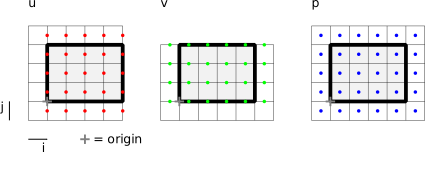
Note: Although the actual grid size for \(u,v,p,F,G\) are different, it is handy to implement all fields with the same size (i.e. the size of \(p\)).
For the ParaView output you need to provide the values of \(u,v\) and \(p\) at arbitrary locations \((x,y)\) relative to the origin of the simulation domain. This should be done by bilinearly interpolating between the 4 neighbouring points where the value is defined. For the transfer between Cartesian coordinates \((x,y)\) and indices \((i,j)\) you need the following:
(mesh width in x and y direction) or ((physical extent in x and y direction) and (number of cells in x and y direction))
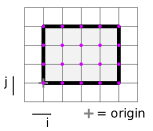
Cartesian coordinates of one reference point, e.g. the most bottom left grid point. In the reference implementation, origin refers to the lower left point of the computational domain, as indicated in
indices.the OutputWriter provided in the Submission1 of exercise 1 doesn’t need to be changed
the provided OutputWriter makes use of your implementation of the interpolateAt(x,y) function, where x and y are the coordinates relative to the lower left corner/origin of the simulation domain. To work properly, discretization_->nCells() has to give the correct number of cells in the OutputWriter. In the example figures, the function would need to return 4x3 cells.
The provided output writer will then evaluate each quantity at the locations indicated in indices_output.
Boundary conditions in corners
At the corners of the domain, is has to be specified which of the bundary conditions for the adjacent edges has priority. We define that the conditions for the left and right border should be used. In the lid-driven cavity this means that the top right and top left corner points have \(u=0\), i.e. they belong to the glass container. Various videos of this experiment can be found.
Code style
When multiple programmers work together on a larger project they usually agree on a style guide. The style guide defines rules for the code layout, e.g. whether to put an opening brace { in the same line as the previous statement or in its own line or how variables should be defined regarding capitalization: CamelCaseFirstLetterCapitalCase, camelCaseFirstLetterLowerCase, under_score_style, etc. If you need inspiration, you can browse through the popular and very detailed Google Style Guide or the equally detailed CppCoreGuidelines by C++ inventor Bjarne Stroustrup. Furthermore, there are idioms that are considered valid irrespective of any style guide, such as
Clarity is king - Find intention-revealing names for functions and variables, avoid confusion.
Do one thing - Your methods and classes should be small.
Don’t repeat yourself - Copy & pasting large code sections is a bad idea.
Comments are a love letter to your future self.
There is a famous book “Clean Code: A Handbook of Agile Software Craftsmanship” by Robert C. Martin (“Uncle Bob”). You can read this very short summary.
For the submissions, no style guide will be enforced.
Consider the following example code to compute a derivative. Which version is the clearest to you?
Version 1:
1//! compute the 1st derivative ∂ (uv) / ∂y
2double CentralDifferences::computeDuvDy(int i, int j) const
3{
4  return 1./this->meshWidth_[1] * ((v(i,j)+v(i+1,j)) / 2. * (u(i,j)+u(i,j+1)) / 2. - (v(i,j-1)+v(i+1,j-1)) / 2. * (u(i,j-1)+v(i,j)) / 2.);
5}
Version 2:
 1//! compute the 1st derivative ∂ (uv) / ∂y
 2double CentralDifferences::computeDuvDy(int i, int j) const
 3{
 4  const double dy = this->meshWidth_[1];      // mesh width in y direction, δy
 5
 6  const double v_iplushalf_j      = (v(i,j)     + v(i+1,j)  ) / 2.;     // v at top right corner of cell
 7  const double v_iplushalf_jminus = (v(i,j-1)   + v(i+1,j-1)) / 2.;     // v at bottom right corner of cell
 8
 9  const double u_i_jplushalf      = (u(i,j)     + u(i,j+1)  ) / 2.;     // u at top right corner of cell
10  const double u_i_jminushalf     = (u(i,j-1)   + v(i,j)    ) / 2.;     // u at bottom right corner of cell
11
12  return 1./dy * (v_iplushalf_j * u_i_jplushalf - v_iplushalf_jminus * u_i_jminushalf);
13}
In version 2 you might spot the copy-paste error in line 10 by chance that you’ll almost never find in version 1. The variable names follow the symbols in the lecture notes. However, maybe version 3 will be even easier to understand.
Version 3:
 1//! compute the 1st derivative ∂ (uv) / ∂y
 2double CentralDifferences::computeDuvDy(int i, int j) const
 3{
 4  const double dy = this->meshWidth_[1];      // mesh width in y direction, δy
 5
 6  const double vTopRight    = (v(i,j)     + v(i+1,j)  ) / 2.;     // v at top right corner of cell
 7  const double vBottomRight = (v(i,j-1)   + v(i+1,j-1)) / 2.;     // v at bottom right corner of cell
 8
 9  const double uTopRight    = (u(i,j)     + u(i,j+1)  ) / 2.;     // u at top right corner of cell
10  const double uBottomRight = (u(i,j-1)   + v(i,j)    ) / 2.;     // u at bottom right corner of cell
11
12  return 1./dy * (vTopRight * uTopRight - vBottomRight * uBottomRight);
13  // (Don't copy & paste this, contains an error!)
14}
If you code all formulas in a similar clear style and add lots of comments, debugging will be easier.
Testing
For larger software projects it is advisable to test individual components before plugging everything together. This can either be done by using an external library for unit testing or by simply writing additional testing routines for key components.
A single test routine should test a single function (component) of the program. In general, the test routine calls the method under testing with some parameters and checks if the result computed is valid. Think of meaningful scenarios that should be tested, e.g. corner cases of the input parameters, a known test function, …
1void test_func1() {
2  double *input, *output;
3  init(output, input); // initialize memory
4  setup_data(input); // setup the input data
5  func1(output, input); // call the function under test with input data
6  check_output(output); // check the result and report errors
7  cleanup(output, input); // clean-up memory
8}
As an example, let’s take a look at a method that computes the x-derivative on a scalar field. To test this method we have to feed the method with data. Good choices for this test are artificially generated fields with a known derivative. The test should be easy but not to easy: Testing the x-derivative on a constant field should result in a 0 field. However, this is only a corner case. A linear or quadratic function as input is a better choice.
Keep in mind that the computer arithmetic is not exact. Use the relative error \(|x_i-u_i|/|x_i|\) and a reasonable error threshold to check numerical results.
The more function, methods, and routines you test while developing, the easier it is to troubleshoot the complete software in the end. There is even a paradigm called “test driven development” that basically says: first think of tests and implement them, before writing the actual code that should be tested.
Debugging
Debugging the code can be done in various ways.
Adding additional output statements to understand what is happening with the data at different locations.
Looking at the output files and guessing what part of the implementation could be wrong.
Carefully and suspiciously reading the source code, adding a lot of comments and trying to find locations where it won’t work as intended.
Using tools.
The last option will be discussed in the following.
GDB
If the program crashes you can easily use the GNU debugger, gdb. Compile the program in debug target (cmake -DCMAKE_BUILD_TYPE=debug .. && make install). Execute
gdb ./numsim
Gdb opens. Execute run <arguments> where you provide the arguments that would usually be given to numsim.
Alternatively, instead of running gdb, define the following alias in the terminal (you can also add it to ~/.bashrc to persist):
alias gdbrun='gdb -ex=run --args '
Then you can simply prepend gdbrun to your normal command and get the same effect:
gdbrun ./numsim lid_driven_cavity.txt
The program starts executing. You can interrupt anytime with Ctrl+C or wait for the program to eventually crash. The following is an example output when the program is interrupted.
 1std::array<int, 2ul>::operator[] (this=0x555555799a98, __n=0) at /usr/include/c++/7/array:189
 2189         operator[](size_type __n) const noexcept
 3>>> bt
 4#0  std::array<int, 2ul>::operator[] (this=0x555555799a98, __n=0) at /usr/include/c++/7/array:189
 5#1  0x00005555555663ab in StaggeredGrid::pIEnd (this=0x555555797ea8) at /store/wiss/2019/12_numsim/code/src/discretization/0_staggered_grid.cpp:191
 6#2  0x0000555555567411 in SOR::solve (this=0x555555799a90) at /store/wiss/2019/12_numsim/code/src/pressure_solver/sor.cpp:34
 7#3  0x000055555555b30d in Computation::computePressure (this=0x7fffffffc920) at /store/wiss/2019/12_numsim/code/src/computation/computation.cpp:221
 8#4  0x000055555555b72f in Computation::runSimulation (this=0x7fffffffc920) at /store/wiss/2019/12_numsim/code/src/computation/computation.cpp:270
 9#5  0x0000555555557884 in main (argc=2, argv=0x7fffffffcb38) at /store/wiss/2019/12_numsim/code/src/main.cpp:11
10>>> frame 2
11#2  0x0000555555567411 in SOR::solve (this=0x555555799a90) at /store/wiss/2019/12_numsim/code/src/pressure_solver/sor.cpp:34
1234          for (int i = discretization_->pIBegin()+1; i < discretization_->pIEnd()-1; i++)
13>>> l
1429      {
1530        // update pressure values
1631        // loop over interior cells
1732        for (int j = discretization_->pJBegin()+1; j < discretization_->pJEnd()-1; j++)
1833        {
1934          for (int i = discretization_->pIBegin()+1; i < discretization_->pIEnd()-1; i++)
2035          {
2136            const double p       = discretization_->p(i,j);
2237            const double pLeft   = discretization_->p(i-1,j);
2338            const double pRight  = discretization_->p(i+1,j);
24>>> info locals
25i = 14
26j = 6
27dx = 0.10000000000000001
28dy = 0.10000000000000001
29dx2 = 0.010000000000000002
30dy2 = 0.010000000000000002
31nCells = {
32  _M_elems = {[0] = 20, [1] = 20}
33}
34nCellsTotal = 400
35r2 = 2.8545453613127607e-09
36iterationNo = 24
In line 3 at the prompt, “bt” for “backtrace” is typed in. The current backtrace of the program is printed in lines 4-9. We see, that the program is currently in the SOR solver, in a method called pIEnd and in this method, the “[]”-operator is being called. The numbers at the beginning of these lines specify the stack frame.
Next, in line 10, we select frame 2 to inspect the solve method. The current line of code is printed in line 12.
We want to have more context and type “l” for “list”. 5 surrounding code lines at top and bottom of this line are printed.
To get all current variable values, we type “info locals” in line 24. All locally defined values are printed with their current value. We can see that it is currently the 24th iteration and we are at \((i,j)=(14,6)\) out of \((20,20)\) cells. Exit with Ctrl+D.
You can also set break points manually or step through the execution of the code line by line. See, for example, this course for more explanations or this compact cheatsheet.
The following is another example of a backtrace. This time, an assertion has failed. It says which one in line 7 (“0 <= i && i < size_[0]”). You can even directly see the indices where \(v\) was tried to be evaluated in line 9 (“StaggeredGrid::v (this=0x555555792ea8, i=-2, j=-1)”).
 1Catchpoint 1 (signal SIGABRT), __GI_raise (sig=sig@entry=6) at ../sysdeps/unix/sysv/linux/raise.c:51
 251    ../sysdeps/unix/sysv/linux/raise.c: No such file or directory.
 3>>> bt
 4#0  __GI_raise (sig=sig@entry=6) at ../sysdeps/unix/sysv/linux/raise.c:51
 5#1  0x00007ffff6358801 in __GI_abort () at abort.c:79
 6#2  0x00007ffff634839a in __assert_fail_base (fmt=0x7ffff64cf7d8 "%s%s%s:%u: %s%sAssertion `%s' failed.\n%n", assertion=assertion@entry=0x555555563f28 "0 <= i && i < size_[0]", file=file@entry=0x555555563ee8 "/store/wiss/2019/12_numsim/code/src/data_management/array2d.cpp", line=line@entry=29, function=function@entry=0x555555563fe0 <Array2D::operator()(int, int) const::__PRETTY_FUNCTION__> "double Array2D::operator()(int, int) const") at assert.c:92
 7#3  0x00007ffff6348412 in __GI___assert_fail (assertion=0x555555563f28 "0 <= i && i < size_[0]", file=0x555555563ee8 "/store/wiss/2019/12_numsim/code/src/data_management/array2d.cpp", line=29, function=0x555555563fe0 <Array2D::operator()(int, int) const::__PRETTY_FUNCTION__> "double Array2D::operator()(int, int) const") at assert.c:101
 8#4  0x000055555555eea7 in Array2D::operator() (this=0x555555792f00, i=-1, j=0) at /store/wiss/2019/12_numsim/code/src/data_management/array2d.cpp:29
 9#5  0x0000555555562204 in StaggeredGrid::v (this=0x555555792ea8, i=-2, j=-1) at /store/wiss/2019/12_numsim/code/src/discretization/staggered_grid.cpp:89
10#6  0x0000555555560bdb in Discretization::computeD2vDx2 (this=0x555555792ea0, i=-1, j=-1) at /store/wiss/2019/12_numsim/code/src/discretization/discretization.cpp:30
11#7  0x0000555555558f85 in Computation::computePreliminaryVelocities (this=0x7fffffffca00) at /store/wiss/2019/12_numsim/code/src/computation.cpp:186
12#8  0x00005555555596db in Computation::runSimulation (this=0x7fffffffca00) at /store/wiss/2019/12_numsim/code/src/computation.cpp:253
13#9  0x00005555555572f4 in main (argc=2, argv=0x7fffffffcbf8) at /store/wiss/2019/12_numsim/code/src/main.cpp:11
Memcheck
Another convenient tool, to debug memory errors, is valgrind. It can be used if the program gives “Segmentation Violation” errors.
We prepend “valgrind –tool=memcheck” to our call like this:
 1$ valgrind --tool=memcheck ./numsim lid_driven_cavity.txt
 2==21369== Memcheck, a memory error detector
 3==21369== Copyright (C) 2002-2017, and GNU GPL'd, by Julian Seward et al.
 4==21369== Using Valgrind-3.13.0 and LibVEX; rerun with -h for copyright info
 5==21369== Command: ./numsim lid_driven_cavity.txt
 6==21369==
 7Settings:
 8  physicalSize: 2 x 2, nCells: 20 x 20
 9  endTime: 10 s, re: 1000, g: (0,0), tau: 0.5, maximum dt: 0.1
10  dirichletBC: bottom: (0,0), top: (1,0), left: (0,0), right: (0,0)
11  useDonorCell: true, alpha: 0.5
12  pressureSolver: SOR, omega: 1.6, epsilon: 1e-05, maximumNumberOfIterations: 10000
13This is debug mode (cmake -DCMAKE_BUILD_TYPE=Release . for release mode.)
14==21369== Invalid read of size 8
15==21369==    at 0x10E161: Computation::computeTimeStepWidth() (computation.cpp:71)
16==21369==    by 0x10F646: Computation::runSimulation() (computation.cpp:256)
17==21369==    by 0x10B883: main (main.cpp:11)
18==21369==  Address 0x8dc3178 is 24 bytes after a block of size 448 in arena "client"
19==21369==
20==21369== Invalid read of size 8
21==21369==    at 0x10E1A3: Computation::computeTimeStepWidth() (computation.cpp:73)
22==21369==    by 0x10F646: Computation::runSimulation() (computation.cpp:256)
23==21369==    by 0x10B883: main (main.cpp:11)
24==21369==  Address 0x8dc3178 is 24 bytes after a block of size 448 in arena "client"
25
26...
This shows that there are serious memory errors in the tested program. “Invalid read of size 8” means that we access an element outside the allocated range. Valgrind also tells us in lines 15 and 27 in which source file and line the errors occurs.
Timestep width
Note what influences the time step width, \(dt\):
The Reynolds number, \(Re\).
The spatial mesh resolution, \(dx,dy\).
The maximum absolute velocities, \(|u_{max}|, |v_{max}|\), also the safety factor \(\tau\).
In the last time step, you can decrease the time step width such that the end time, \(t_{end}\), will be reached exactly
The time step width has to be computed directly after the boundary values for the velocities are set. This is especially important for the first time step. For the lid-driven cavity examples, the resulting time step width for the first time step is 0.025.
Solver tolerance
The given tolerance, \(\epsilon\) for the residual norm should be taken into account as follows. The abortion criterion for the solver iteration depends on the residual vector, \(\textbf{r}=\textbf{rhs}-M\textbf{p}\), and is given by:
\(\dfrac{1}{N}|\textbf{r}|^2 \leq \epsilon^2\),
with \(N\) being the number of pressure values in the computational domain or the number of entries in \(\textbf{r}\).
Reference solution
The submission will be tested for the lid-driven cavity and 4 further scenarios.
The solution for the lid driven cavity is given in this file.
scenario1 varies \(Re\) and also slightly nCellsX, i.e. \(dx\)
scenario2 varies \(Re\), physicalSize and boundary conditions for \(u\) at bottom and top.
scenario3 varies nearly everything, except external forces. It is provided here as well as a corresponding output.
scenario4 adds external forces and varies physicalSize and nCells, but \(dx = dy\) still holds, it also varies endTime, maximumDt and \(\omega\).
All resources for exercise 1 are located in this folder within the public gitlab repository, where also this text of the tutorial is located.