Code architecture
So far, you have learned all the basics that are needed to work on the first submission. Before writing the program, the next step is to design the architecture of the code. Recapitulate what the program should do and how this is done mathematically. You can refer to your lecture notes or the “script” on ILIAS.
Then, discuss the code architecture in your group. Write down the class names or draw an UML class diagram of the involved classes and how they relate to each other.
If you’re done, compare your results with Fig. 7, which is the architecture of the reference implementation. You are encouraged to use your own approach as long as it is object oriented.
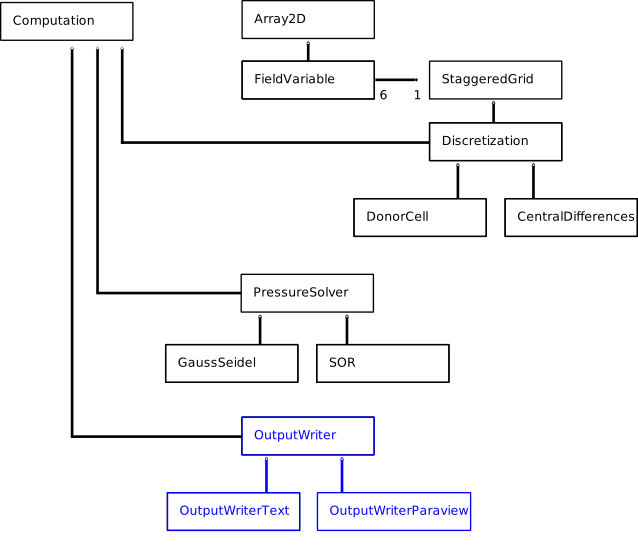
Fig. 7 UML diagram of a possible code architecture for exercise 1.
The blue classes in Fig. 7 are responsible for file output. Their source files are provided on the Submission page. The OutputWriterText creates human readable text files of the involved field variables. It is meant for debugging. The OutputWriterParaview creates files that can be viewed with Paraview. They are useful for visualizing the results but also to automatically check if the results of your submission are correct. Therefore, it is important that your submitted program outputs its results following the implementation in OutputWriterParaview. You will probably need to adjust those classes, however, as they depend on the interfaces of other classes.
To better understand the presented sample architecture, you can read the documentation of the reference implementation. It was automatically generated using doxygen. It contains a lot more graphics of the architecture as well as all method and data member names for all classes. (This means, if you’re lazy you can just kind of copy the reference implementation and try to implement the methods. By this you won’t lern much about how to design working code architecture.)